See it in action
Watch Voqua work
Chat translation, voice notes, replies in your own voice, and live translated calls — in one quick walkthrough.

Voqua translates your WhatsApp chats and voice notes inline, lets you reply in your own cloned voice, and runs live translated calls — captions and all. 140+ languages, right where you already sell.
Chat translation, voice notes, replies in your own voice, and live translated calls — in one quick walkthrough.
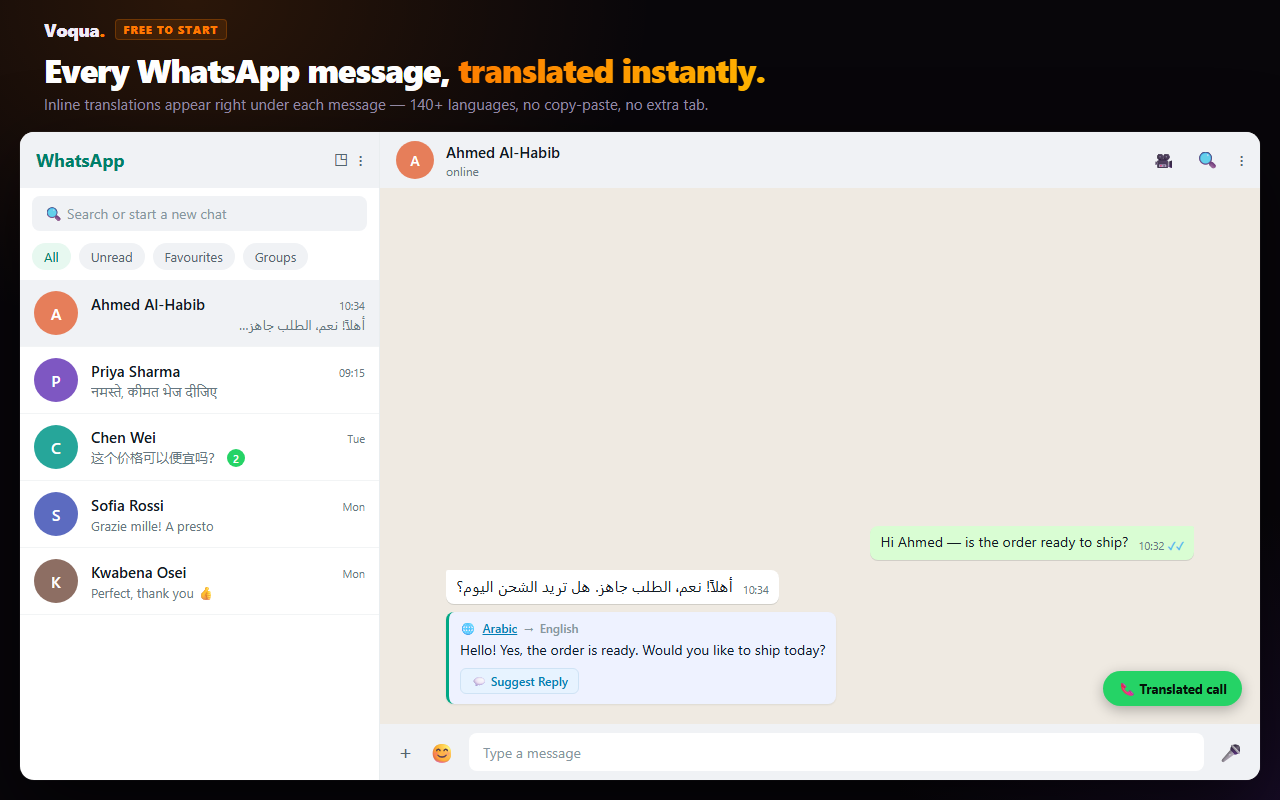
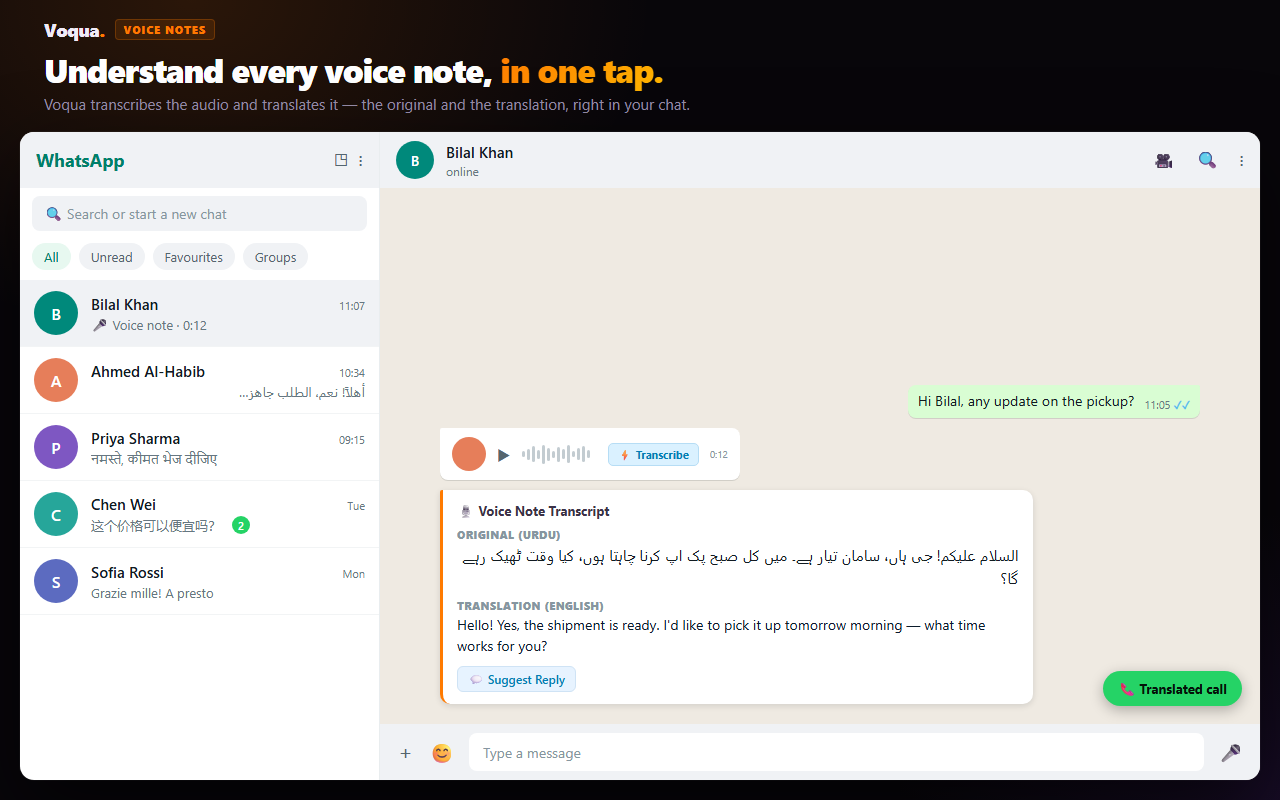
Open WhatsApp Web and every incoming message translates inline, instantly — plus one-tap voice-note transcription. Nothing to set up, no account needed.
Free · No sign-upCreate a free account to reply in your own cloned voice and start live translated calls — with captions, transcripts and follow-up drafts. Upgrade only when you need more.
Free accountPrefer to jump straight to a call? Start one at voqua.app — no extension needed.
Yes — on your phone. WhatsApp added Message Translations in September 2025: long-press a message and tap Translate, with on-device processing. But it is limited in three ways that matter if you sell across borders.
It covers 6 languages on Android (English, Spanish, Hindi, Portuguese, Russian, Arabic) and Apple's 21 on iOS. It translates text only — voice notes go through a separate transcript feature capped at about 5 languages on Android. And as of 2026 it is not available on WhatsApp Web or the desktop app at all, which is where most business conversations actually get handled.
Voqua fills exactly those gaps: it runs on WhatsApp Web, covers 140+ languages, translates voice notes as well as text, and adds replies in your own voice plus live translated calls.
| Capability | ⚡ Voqua | WhatsApp built-in |
|---|---|---|
| Works on WhatsApp Web / desktop | ✓ Yes | ✗ Mobile only |
| Languages for chat translation | 140+ | 6 on Android · 21 on iOS |
| Voice notes translated, not just transcribed | ✓ Transcript + translation | ✗ Transcript only, ~5 langs |
| Drafts your reply in their language | ✓ Yes | ✗ No |
| Live translated calls | ✓ Yes | ✗ No |
Sources: WhatsApp — Introducing Message Translations (Sept 2025) · WhatsApp — Voice Message Transcripts. Last checked July 2026.
Every foreign-language message means copy, paste, translate, copy back. Voice notes get ignored. And a phone call? Impossible.
Chats translate inline. Voice notes transcribe in a click. Reply in your own voice. And when it matters, jump on a live translated call — you each speak your language, Voqua interprets.
Chat translation, voice-note transcription, and translated calls — one product, no copy-pasting, no extra apps.
Incoming WhatsApp messages get a translation overlay instantly — language auto-detected, all chats at once, no clicking. Context-aware, so "same as before" translates by meaning, not word-for-word.
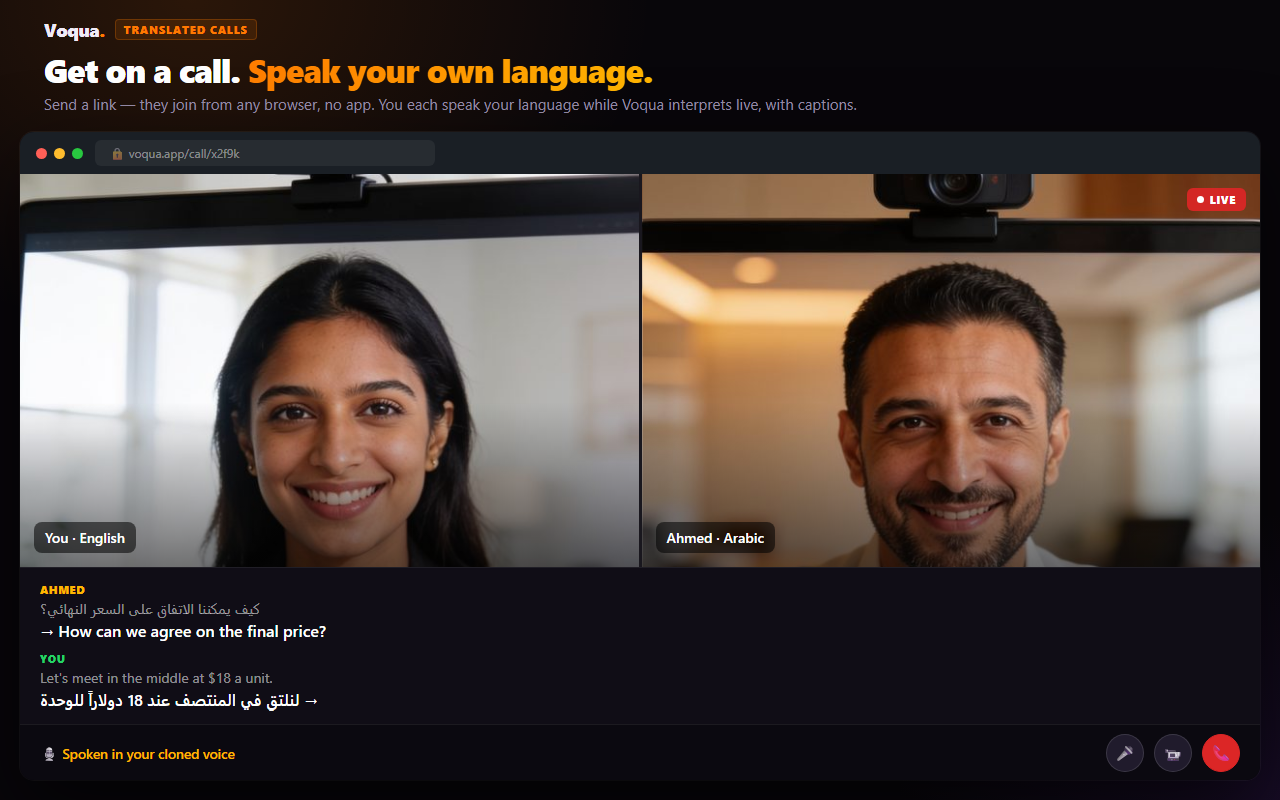
Send a link, they join in a browser — no app, no account. You each speak your own language while Voqua interprets out loud, with live captions.
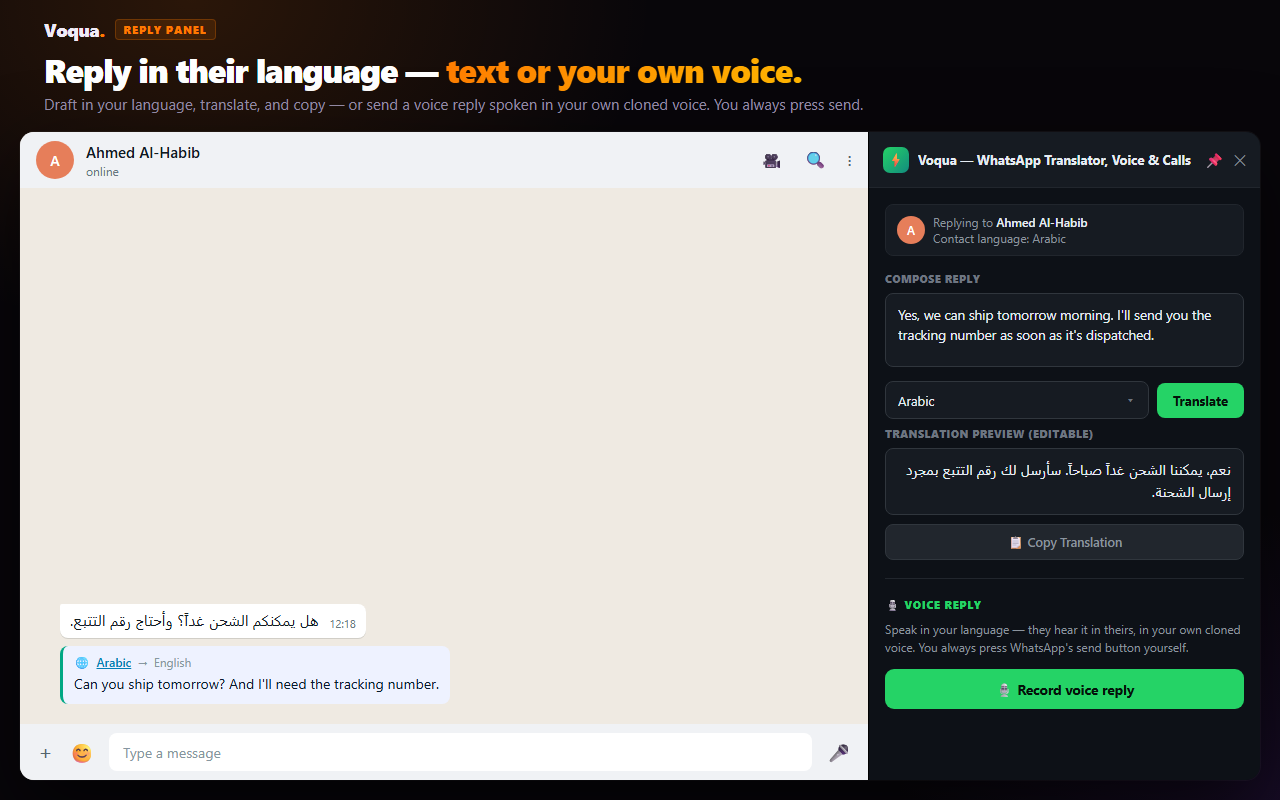
Clone your voice once, then send voice replies in your customer's language — in your voice, not a robotic one. On calls, they hear you speaking their language as if you were fluent.
Every call is saved as a bilingual transcript in your history. Afterwards, Voqua writes a summary in your language and a ready-to-send follow-up message in your customer's — one tap to copy into WhatsApp.
Draft in English, see the live translation, copy with one tap, paste into WhatsApp. Zero ban risk — Voqua never sends for you. You always hit send yourself.
Powered by Google Gemini, Deepgram, and premium neural voices — tuned for Arabic, Urdu, Hindi, and Thai, the languages your customers actually use.
When chat isn't enough, send a voqua.app/call link. Your customer taps it and joins from any browser — no install, no account. You each speak your own language; Voqua interprets live, out loud, with captions.
Speech → translation → spoken audio in ~1–2 seconds, both directions, with on-screen captions.
On Voice & Power plans, the other side hears the translation in your own voice.
Hang up and get a recap plus a ready-to-send message in their language.
How translated calls actually work, and how they compare to other tools →
Real screens from Voqua — chat translation, voice notes, replies in your own voice, and translated calls.
No other WhatsApp Web translator covers chat, voice notes, and live calls in one place.
| Feature | ⚡ Voqua | Google Translate | Other Extensions |
|---|---|---|---|
| Inline WhatsApp translation | ✓ Yes | ✗ Copy-paste | ✓ Some |
| Voice note transcription + translation | ✓ Yes | ✗ No | ✗ Rare |
| Reply in your own cloned voice | ✓ Yes — exclusive | ✗ No | ✗ No |
| Live translated calls (browser, no install) | ✓ Yes — exclusive | ✗ No | ✗ No |
| Call transcript + AI summary & follow-up | ✓ Yes | ✗ No | ✗ No |
| Context-aware ("same as before") | ✓ Yes | ✗ Word-for-word | ✗ Word-for-word |
Full, named comparisons: the best WhatsApp translator apps (phone and Web) · the best Chrome extensions for WhatsApp Web.
Each plan adds a capability. Cancel anytime — access continues until your billing period ends.
Payments are non-refundable · Cancel anytime, access continues until period end · Terms & Refund Policy
No. Calls run entirely in the browser at voqua.app. You create a call and send the link; the other person taps it and joins — no install and no account on their side. The Chrome extension is only for translating inside WhatsApp Web.
No. The extension only reads WhatsApp messages — it never sends or clicks on your behalf. Replies are composed in a side panel, copied to your clipboard, and sent by you. Same read-only approach as accessibility tools.
On Voice and Power plans, you record a short 60-second sample once. Voqua then speaks your translated voice replies — and your side of live calls — in your own voice. You may only clone your own voice. (Some languages, such as Urdu, use a natural neural voice instead.)
Chat and voice-note translations are processed live and not stored. Call transcripts are saved to your own history so you can review, search, and get summaries — and you can delete any of them anytime. We never store raw call audio. Full privacy policy →
Chat and voice-note translation cover 140+ languages. Spoken voice (replies and calls) covers a large, growing set including English, Arabic, Hindi, Urdu, Thai, Indonesian, and major European languages. If a language isn't voice-ready yet, you still get the text translation.
Subscription payments are non-refundable. You can cancel anytime and keep full access until the end of your current billing period. If you were charged in error, email haroonbutt2002@gmail.com. See our Terms & Refund Policy.
Translate the chat, reply in your voice, and get on a call — in their language.