How to auto-translate WhatsApp messages
Automatic translation exists on WhatsApp, but only on one platform and in six languages. Here's what you can switch on, where it stops, and how to turn translation off when WhatsApp starts translating things you didn't ask it to.
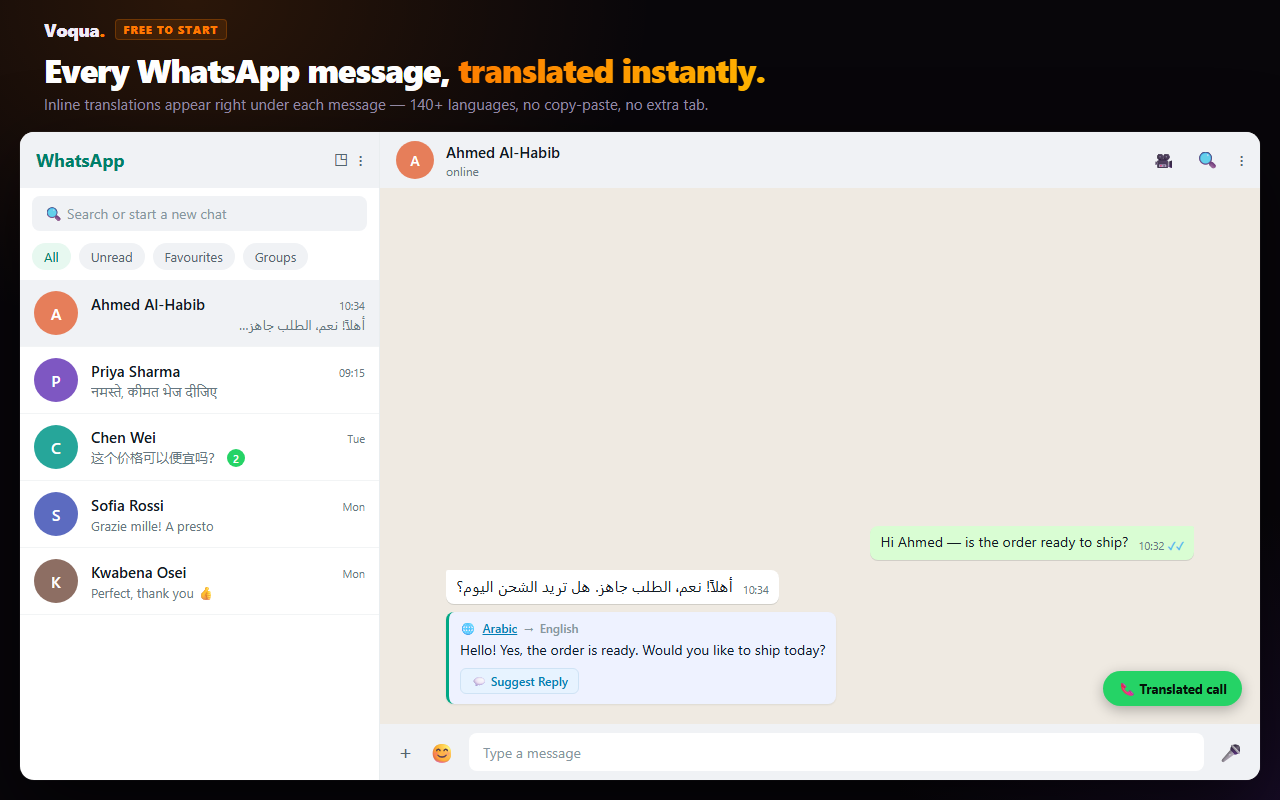
"Auto-translate" on WhatsApp means one of two things. Either every incoming message in a chat appears in your language without you tapping anything, or what you type is translated before it's sent. WhatsApp itself only does the first, only on Android, and only for six languages. Everything else needs another tool.
Android: long-press a message in the chat, tap Translate, and switch on translation for all new messages in that chat. iPhone: no automatic mode yet; translate one message at a time. WhatsApp Web: no built-in translation; use an extension such as Voqua, which translates every message inline as it arrives.
Where WhatsApp auto-translate works
| Where | Auto-translate a whole chat? | Languages |
|---|---|---|
| Android app | Yes, built in, chat by chat | 6: English, Spanish, Hindi, Portuguese, Russian, Arabic |
| iPhone app | No, one message at a time (automatic mode reported in beta) | Apple's on-device languages (21 at launch) |
| WhatsApp Web | No built-in translation; yes with an extension | Depends on the extension (Voqua: 140+) |
| WhatsApp Desktop app | No, and extensions can't run there | — |
How to auto-translate a WhatsApp chat on Android
WhatsApp added Message Translations in September 2025. On Android it includes a setting that translates every new incoming message in a chat, so you stop long-pressing one message at a time.
- Update WhatsApp from the Play Store. The feature rolled out gradually, so an old version won't show it.
- Open the chat, long-press a message in the other language, and tap Translate.
- Pick the language pair. The first time, your phone downloads a language pack, so use Wi-Fi and make sure you have free storage.
- In the translation options, switch on translation for all new messages in this chat.
If you don't see the Translate option or the automatic setting, the cause is almost always one of three things: an old app version, a language outside the six above, or the rollout not having reached your account yet. Our WhatsApp translator not working guide goes through each error message.
Translation runs on your phone, not on WhatsApp's servers, so it doesn't break end-to-end encryption. It also works in group chats, though a group where people write in several languages translates less cleanly than a one-to-one chat.
Can you auto-translate WhatsApp on iPhone?
Not officially, as of October 2026. On iPhone, WhatsApp uses Apple's on-device translation, which gives you more languages than Android, but you translate each message yourself: long-press it, then tap Translate.
WABetaInfo reported in March 2026 that WhatsApp was building a per-chat automatic translation switch for iOS, set from the chat info screen. That is a beta report, not a release. Until it ships, iPhone users who want hands-free translation have to use WhatsApp Web on a computer with an extension.
How to auto-translate WhatsApp Web
WhatsApp Web and the Desktop app have no translation at all, automatic or manual. On WhatsApp Web, a translation extension fills the gap. With Voqua:
- Install Voqua for Chrome and open web.whatsapp.com.
- Choose your language once.
- Open any chat. Incoming messages show a translation underneath the original, so you can still see what was actually written.
- Voice notes get a one-click transcript plus translation, which WhatsApp doesn't offer on any platform.
The free plan covers 30 chat translations and 5 voice-note transcriptions a day. Other WhatsApp Web translators exist, and we compare them by name in the best Chrome extensions for WhatsApp Web. Note that extensions only work in the browser. The WhatsApp Desktop app can't load them.
Every WhatsApp Web message, in your language
Voqua translates WhatsApp Web chats inline in 140+ languages, transcribes and translates voice notes, and drafts your replies in your contact's language. Free to start.
Add to Chrome — FreeAuto-translating what you send
WhatsApp's translator only translates messages you receive. It never translates what you type before sending. Two ways to get that:
- On Android, Gboard Translate. In the Gboard keyboard, open the menu, choose Translate, and pick the language. What you type in your language is inserted into the chat in theirs.
- On WhatsApp Web, Voqua's reply composer. Write your reply in your own language and Voqua drafts it in your contact's language for you to check and send.
Why is WhatsApp translating messages I didn't ask it to?
If messages suddenly appear translated, or what you type comes out in another language, one of these is switched on:
- Automatic translation for that chat (Android). Long-press a message, open the translation options again, and switch off translation for new messages.
- Gboard's Translate mode. It stays on after you leave it, which is why typed messages "get translated" on their own. Close the translate bar at the top of the keyboard.
- Google Translate's Tap to Translate. A floating bubble that pops up whenever you copy text. Turn it off in the Google Translate app under Settings → Tap to Translate.
- An extension on WhatsApp Web. Disable it for web.whatsapp.com in your browser's extension settings, or change its target language.
Quick answers
Can WhatsApp automatically translate messages?
Yes, on Android. WhatsApp's Message Translations lets Android users turn on automatic translation for a whole chat, so every new incoming message in it is translated. It covers six languages on Android: English, Spanish, Hindi, Portuguese, Russian and Arabic.
Does WhatsApp auto-translate work on iPhone?
Not officially yet. On iPhone you translate one message at a time: long-press it and tap Translate. A per-chat automatic translation switch has been reported in iOS beta builds, but WhatsApp has not released it.
Can WhatsApp Web auto-translate messages?
Not on its own. WhatsApp Web and the Desktop app have no built-in translation. On WhatsApp Web you need a browser extension that translates messages inside the chat, such as Voqua.
Does auto-translate work in WhatsApp groups?
WhatsApp's translation works in group chats as well as one-to-one chats. In a group where people write in several languages, translation is less clean, because the language pair is set for the chat, not for each person.
How do I stop WhatsApp from translating my messages?
Check four things: the automatic translation setting for that chat on Android, Gboard's Translate mode (which translates what you type), Google Translate's Tap to Translate bubble, and any translation extension on WhatsApp Web. Turn off whichever one is active.
WhatsApp Blog — Introducing Message Translations · TechCrunch — WhatsApp can now translate messages on iOS and Android · Report on WABetaInfo's iOS automatic translation finding (March 2026)
Platform behaviour checked 16 October 2026.